
IPTV Player: HD Online TV
Rewards Apps ZoneVideo Players & Editors
0.00.00 Reviews
- Version
- 1.0.0
- Installs
- 100.00K
- Age Rating
- Everyone
Screenshots

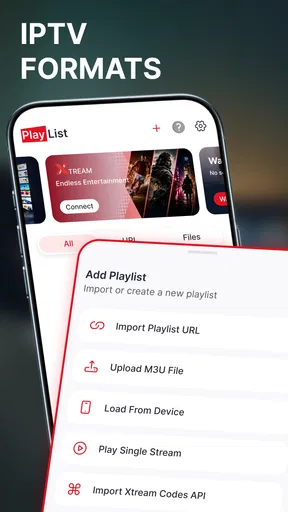
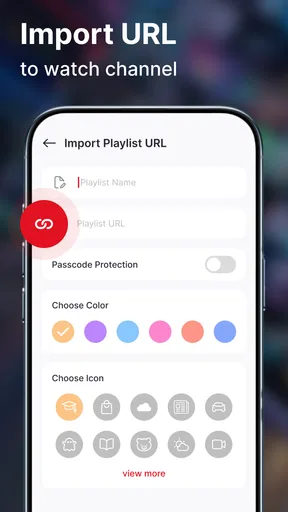
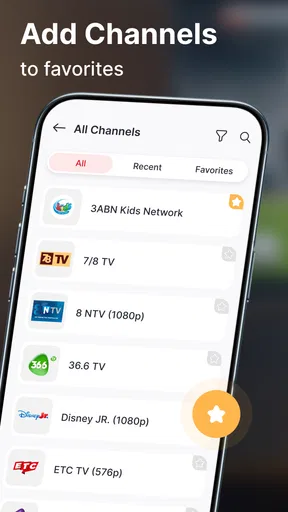
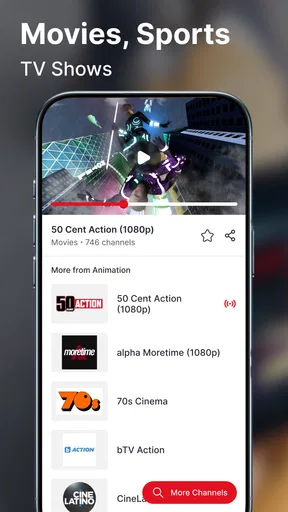
Our Review of IPTV Player: HD Online TV
 Analysis by Appyee
I tested IPTV Player: HD Online TV as a practical video player for households that use M3U playlists, Xtream Codes, or locally available video sources. My first impression was that it aims to stay focused: instead of trying to become a full entertainment platform, it gives you a place to bring compatible IPTV details together and start watching. That narrow purpose is useful when your main need is playback rather than recommendations, social features, or a large built-in catalog.
The app comes from Rewards Apps Zone and is listed as a free app in the Video Players & Editors category. It is suitable for Everyone, which makes the household angle especially relevant, although an age label alone should not be treated as a substitute for checking the content supplied through a playlist. In my experience, the real question is not whether the player is simple enough for a family device, but whether the person managing the playlists can keep the setup organized and appropriate for everyone who uses it.
How it fits into a shared household screen
A realistic use case is a living-room phone, tablet, or other compatible device that several people use at different times. One person may have an M3U playlist, another may receive Xtream Codes from a legitimate provider, and someone else may simply want to open a video. A player that handles these different starting points can reduce the need to switch between several unrelated apps.
That convenience has a practical limit: the application is a playback tool, not a household media manager. I would therefore decide in advance who is responsible for entering playlist information, checking that channels are labeled clearly, and removing sources that no longer belong on the shared device. This small bit of preparation makes a bigger difference than repeatedly troubleshooting the player after every family member has changed something.
For a shared screen, I prefer a simple arrangement with one clearly named playlist for common viewing and separate arrangements for personal use when possible. That is not a special family feature; it is a workflow choice. It prevents a guest or child from having to search through an untidy collection and reduces the chance of accidentally opening the wrong source.
The app is most appealing when your household already has lawful access details and wants a single player for them. It is less useful if you expect the application itself to provide channels, discover new programs, or replace a subscription service. The distinction matters because an IPTV player and a streaming catalog solve different problems.
What the main formats mean in daily use
M3U playlists are convenient when you receive a prepared list of channels or videos in that format. They can also become difficult to manage when the list is long, poorly labeled, or frequently changed. Xtream Codes are another common way of connecting to a service, but they depend on entering the correct account details and server information. A typing mistake can look like a playback failure even when the app is working normally.
I would keep the original connection details somewhere safe before entering them on a shared device. If a playlist is updated by its provider, having the original source information nearby makes it easier to refresh the setup instead of guessing which field has changed. This is one of the less obvious advantages of treating the app as a front end for your sources rather than as the source itself.
For ordinary video playback, the useful test is whether the files or streams you care about open consistently and whether navigation feels understandable to the people using the device. A player can support a format in principle and still feel inconvenient if a household has to remember a complicated sequence every time it wants to watch something. I would test the exact sources you plan to use before making it the only player in the home.
Setting boundaries before handing over the device
Because the app is free, it is easy to install it casually and assume the setup will take care of itself. I would not approach it that way on a shared device. First, decide whether the device is for common viewing, personal viewing, or both. Then keep the connection information limited to the person who manages the service. This avoids accidental edits and makes it clearer who should investigate a broken stream.
The application is not the place to store every playlist you have ever tried. Old entries make the interface harder to understand and can create confusion when two sources use similar names. A short, maintained list is more useful than a large archive. If you are testing a new source, I would label it temporarily and remove it after deciding whether it is worth keeping.
There is also an important account boundary. Xtream Codes are access credentials, so I would not pass them around in group chats or leave them visible on a device used by visitors. The app may be free to download, but that does not make the services connected to it public or transferable. Keeping the player and the provider account conceptually separate helps avoid careless sharing.
For children or less technical relatives, I would prepare the player first and explain only the routine they need: open the app, choose the intended list, select a channel or video, and return to the list when finished. I would avoid asking them to edit connection settings. This is not a built-in restriction; it is a sensible household rule that lowers the risk of changing a working setup.
Coordinating viewing without built-in assumptions
Shared use becomes smoother when everyone agrees on a naming system. If one playlist is for news, another for films, and another for personal testing, use names that describe that purpose instead of leaving several entries with vague labels. Clear names are especially helpful on a television-sized display or when someone is using the app for the first time.
I also recommend keeping a short note outside the app with the provider name, the playlist type, and the date you last checked it. The note does not need to contain sensitive credentials in full. Its purpose is to help identify which source is failing. If one list stops loading while another still works, you can narrow the problem to that connection instead of assuming the entire player is broken.
A useful household habit is to test a few regular channels or videos before an important viewing session. IPTV sources can change independently of the player, and a last-minute failure is frustrating when several people are waiting. Testing beforehand also reveals whether a source is slow, incomplete, or labeled differently from what the family expects.
When several people use one device, agree on whether the current stream should be stopped before another person starts watching. This sounds obvious, but it prevents confusion when a stream continues in the background or when someone assumes the device is available. The app can be part of a shared routine, but it cannot create that routine for you.
Another practical trade-off is convenience versus privacy. A permanently configured shared device is quick for everyone, but it exposes more of the household’s viewing setup. A personal device gives each user more control, yet requires repeated configuration or separate access. I would choose the shared approach only when the people using it trust one another and the source owner permits that type of use.
Age context and choosing trustworthy sources
The Everyone rating makes the app approachable for general household use, but it describes the application rather than guaranteeing that every playlist will contain suitable material. A playlist can include channels or videos with very different audiences. For that reason, adults should review the sources before making them available on a family device.
This is particularly important when a playlist uses broad categories or unclear labels. A child may select an item based on its title without understanding what it contains. I would favor clearly named, familiar sources for shared viewing and keep experimental or personal lists away from the main household screen. Again, this is a content-management practice, not a claim that the app provides parental controls.
Trust also applies to the people who provide connection details. Only use playlists and account information from services you are entitled to access. An IPTV player can make a connection easy to enter, but it does not verify ownership, licensing, or the intentions of the source. That responsibility remains with the user.
If an older relative is using the app, the main barrier may be terminology rather than age. M3U and Xtream Codes are not everyday words for many people. I would set everything up with them, write down a plain-language instruction such as “open the family list,” and avoid changing several settings at once. A small printed or saved guide can turn a technical app into something they can use confidently.
Where it stands beside familiar alternatives
Compared with a traditional streaming service, this app offers more control over the sources you bring to it, but less convenience at the discovery stage. A subscription platform usually handles search, artwork, recommendations, and account presentation for you. IPTV Player: HD Online TV is better suited to someone who already has a playlist or access details and wants a player around those materials.
Compared with a basic local video player, it is more relevant when your viewing depends on M3U or Xtream Codes. A local player may be the cleaner choice if you only watch files stored on the device and have no need for IPTV connections. Installing a specialized player for a job you do not perform simply adds another interface to maintain.
Dedicated IPTV applications may offer deeper organization, electronic program guides, recording, profiles, or device-specific controls, depending on the product. I would choose one of those when the household needs a full television-style experience and is willing to spend time learning a more complex system. This app’s appeal is its focused role: it can be the better fit when you want a straightforward player without committing to a large suite of features.
There is also a difference between a free player and a provider’s official app. An official app may offer a more guided setup and support tailored to its own service, while this player can be more flexible across supported source types. The trade-off is that you may have to handle more of the organization and troubleshooting yourself.
Version, compatibility, and everyday friction
The current release is version 1.0.0, and the minimum requirement is Android 7.0. That makes the app relevant to devices that are not running the newest Android software, although compatibility on paper is not the same as a perfect experience on every older phone or tablet. Streaming quality will also depend on the source, the network, and the device, not just the player.
I would begin with one dependable playlist rather than importing a large collection immediately. Start a channel, switch to another item, return to the list, and close and reopen the app. This short check tells you whether the navigation suits your household before you invest time in a more elaborate setup. It also makes it easier to identify whether a problem comes from the source or from the way the list was entered.
One limitation I would keep in mind is that a focused player may leave more responsibility with the user than a polished all-in-one television service. You may need to understand which credentials belong together, recognize when a provider has changed a playlist, and explain the process to other household members. For a technically comfortable user, that is manageable. For someone who wants everything automated, it may feel like unnecessary work.
The free price removes a financial barrier, which is helpful for trying the app with a legitimate source before deciding whether it belongs in your routine. It does not remove the time cost of cleaning up playlists or coordinating shared access. In my view, that time cost is acceptable when the app replaces several awkward playback methods, but not when your needs are limited to opening a few local videos.
Who should use it and who should pass
I would recommend it to people who already understand the IPTV basics, have lawful M3U or Xtream Codes access, and want one flexible player for personal or household viewing. It is also a reasonable option for someone setting up a shared device and willing to take responsibility for naming lists, protecting credentials, and checking content before others use it.
I would skip it if you are looking for a ready-made catalog, automatic recommendations, or a television service that manages subscriptions and programming for you. I would also choose a simpler local player for a device used only for stored videos. The app makes the most sense when its specific connection formats are central to your viewing habits.
For families, the deciding factor is not the Everyone label alone. It is whether an adult can maintain the sources and establish clear boundaries around who may edit them. If that arrangement is realistic, the player can support a tidy shared setup. If everyone needs independent accounts, private histories, or strong built-in controls, another category of app will likely serve you better.
My household verdict
After looking at it as a shared-device tool rather than merely a way to start a stream, I see IPTV Player: HD Online TV as a focused and potentially useful choice. Its value comes from bringing supported IPTV playlists, Xtream Codes, and videos into one playback workflow. The strongest experience will come from users who are comfortable managing the sources behind that workflow.
I like that the app does not need to be treated as a full entertainment ecosystem. A carefully prepared family list, protected connection details, and a simple instruction for less technical users can make it approachable. The less obvious lesson is that organization matters as much as playback: clean labels and a small troubleshooting note can save more frustration than adding more playlists.
My final recommendation is conditional but positive. Try it if your household already has legitimate IPTV access and wants a free player that can sit between those sources and the screen. Keep expectations realistic, review shared content, and do not confuse the player with the service that supplies the streams. With those boundaries in place, it is a sensible Android option for straightforward IPTV playback; without them, a more managed streaming or provider-specific alternative may be the better fit.
Verdict
Strengths of IPTV Player: HD Online TV
- Supports HD streaming for a sharper viewing experience.
- Simple interface makes browsing channels quick and straightforward.
- Works with custom IPTV playlists from different providers.
- Useful full-screen playback for a more immersive experience.
- Channel lists can be organized for easier access to favorites.
Limitations of IPTV Player: HD Online TV
- Content availability depends entirely on the IPTV provider or playlist.
- Some channels may buffer when the internet connection is unstable.
- Playlist setup may be confusing for users unfamiliar with IPTV links.
- HD streaming can consume significant mobile data.
- Compatibility and playback quality may vary between channels.
Similar Picks in This Category
View All
Google TV
Google LLC3.9

iTunes
Apple4.7

YouTube
Google LLC3.8

MX Player
Amazon Mobile LLC4.2

CapCut - Video Editor
Bytedance Pte. Ltd.3.5

PLAYit-All in One Video Player
PLAYIT TECHNOLOGY PTE. LTD.4.5
Frequently Asked Questions
What is IPTV Player: HD Online TV, and how does it work?
IPTV Player: HD Online TV is a media player designed to stream television content from IPTV playlists rather than provide its own television channels. After installing the app, users generally need to add a compatible M3U playlist, Xtream Codes account, or another supported source supplied by a legitimate IPTV provider. The available channels, program guide, and playback quality depend on that provider and the strength of your internet connection.
Does IPTV Player: HD Online TV include free live channels or subscriptions?
The application should be treated primarily as a player, not as a complete television subscription service. Installing it does not necessarily grant access to premium channels, movies, sports, or on-demand programs. You may need to obtain a playlist or login separately, and some providers charge a recurring fee. Before paying, verify what content is included, whether the provider is authorized, and whether the service works on your device.
Can I use IPTV Player: HD Online TV on Android phones, tablets, or TV devices?
Compatibility depends on the specific version available for your platform and the way the app is distributed. It is typically intended for Android mobile devices and may also work on compatible Android TV hardware, although menus can feel more comfortable on a larger screen. Check the store listing, required Android version, remote-control support, and installation requirements before downloading, especially if you plan to use it on a television or TV box.
What internet connection and features are needed for smooth playback?
Live IPTV playback is highly dependent on network stability. Standard-definition channels usually need less bandwidth, while HD streams require a faster and more consistent connection, particularly when several devices share the same network. Wi-Fi signal quality, provider server performance, buffering settings, and the video format can all affect playback. Features such as favorites, an electronic program guide, subtitles, casting, or recording may vary by version and playlist.
Is IPTV Player: HD Online TV safe and legal to use?
The player itself may be a neutral tool, but the legality of the content depends on the playlists and services you connect to it. Use only channels supplied by authorized broadcasters or licensed IPTV providers, and avoid sources promising expensive premium content for unrealistically low prices. Download the app from a trusted store, review requested permissions, avoid suspicious playlist links, and remember that third-party streams can create privacy, security, and reliability risks.
